

Shared Holiday Homes vs Google Calendar for Co-Owned Vacation Homes
If you co-own a vacation home, a shared Google Calendar is often the first booking system the group tries. It is free, familiar, and quick to share. For many small, high-trust groups it stays good enough for years.
It starts to feel thin when more households join, peak dates create tension, maintenance jobs get lost in chat, or nobody can find the insurance policy and WiFi details in the same place. That is when a purpose-built co-ownership tool becomes useful.
This comparison helps you choose honestly. Google Calendar is not “wrong.” Shared Holiday Homes is not required for every group. The right answer depends on how complex your booking rules, tasks, and property information have become.
At a Glance
| Need | Google Calendar | Shared Holiday Homes |
|---|---|---|
| Cost | Free | Paid plans with a free trial |
| Shared stay calendar | Yes | Yes |
| Double-booking protection | Manual / easy to override | Built into bookings |
| Booking windows, peak rotations, approvals | Policy lives outside the tool | Rules can sit on the calendar |
| Usage fairness tracking | Count nights by hand | Usage and insights in one place |
| Shared maintenance tasks | Separate list or chat | Named jobs with due dates |
| Documents and house information | Drive, email, or attachments | Document library and house guides |
| Member access for the whole group | Calendar sharing permissions | Property members with shared access |
For a broader survey of calendar options, see shared holiday home calendar solutions. Use this page when the real question is whether a free Google Calendar is still enough.
When Google Calendar Is Enough
Keep Google Calendar if most of these are true:
Small group of two or three households
With few people, a text before booking still works. Conflicts are rare and easy to resolve face to face.
High trust and low conflict
If nobody races for Christmas week, and everyone updates the calendar promptly, a simple shared view may be all you need.
Personal use only, with light admin
If the home is for owner stays, jobs are informal, and documents live somewhere everyone already knows, you may not need a fuller house system yet.
Everyone already lives in Google Workspace
Zero learning curve matters. If the whole group already opens Google Calendar every day, forcing a new tool can create more friction than it removes.
If that describes your group, stay on Google Calendar. Pay for software only when the calendar alone is no longer carrying the operating load.
Where Google Calendar Falls Short for Co-Ownership
Anyone with edit access can change anyone else’s stay
A shared calendar is usually all-or-nothing. One accidental edit, drag, or deletion can create a double booking or erase a confirmed week.
The calendar does not enforce the booking policy
Google Calendar records events. It does not apply booking windows, peak rotations, minimum stays, or approvals. Those rules live in a separate document, chat thread, or somebody’s memory. Write the 12 booking decisions first either way; the difference is whether the tool can help keep them.
Fairness is manual
Who used 40 nights last year and who used 12? Someone has to count. Disagreements about which events “count” often start there.
Tasks and documents scatter
The plumber’s number, insurance PDF, gutter clean, and arrival notes end up in email, Drive folders, WhatsApp, and old calendar attachments. The calendar shows who is coming; it does not run the house.
There is no single place for house guides
Guests and co-owners still ask where the bins go, how the hot tub works, or what the WiFi password is. That admin load usually falls on one person.
Real Scenarios Side by Side
Two siblings want the same holiday weekend
Google Calendar: Whoever creates the event first wins. The other sibling sees it later and has to negotiate by phone or text. Resentment grows even when both people acted reasonably.
Shared Holiday Homes: The group can set peak-date rules, booking windows, and approvals so prime dates are not a pure race. The calendar shows the outcome under the same rules everyone agreed.
Peak summer weeks keep going to the same household
Google Calendar: Colour codes help you see the pattern, but they do not prevent it. Fairness depends on memory and goodwill.
Shared Holiday Homes: Peak rotations and usage visibility make the pattern hard to ignore. Pair the calendar with a simple usage rotation plan before the next season opens.
A pipe bursts and nobody can find the plumber
Google Calendar: Someone digs through chat history while water spreads.
Shared Holiday Homes: Keep vendor details, manuals, and emergency notes in the document library or house guides so the right person can act without waiting for the “admin” owner to wake up.
The year-end meeting turns into a night-counting argument
Google Calendar: Someone exports months of events and tallies nights in a spreadsheet. People disagree about cancelled stays, overlapping events, and whether maintenance weeks count.
Shared Holiday Homes: Usage and booking history give the meeting a shared baseline, so the conversation can move on to next year’s rules instead of reconstructing last year’s calendar.
What Shared Holiday Homes Adds Beyond a Calendar
Shared Holiday Homes is built for private co-owner groups who already share a holiday home and need the operating layer around the calendar:
One live booking calendar
Everyone books from the same place. Confirmed stays are visible, and double bookings are not left to hope and careful clicking.
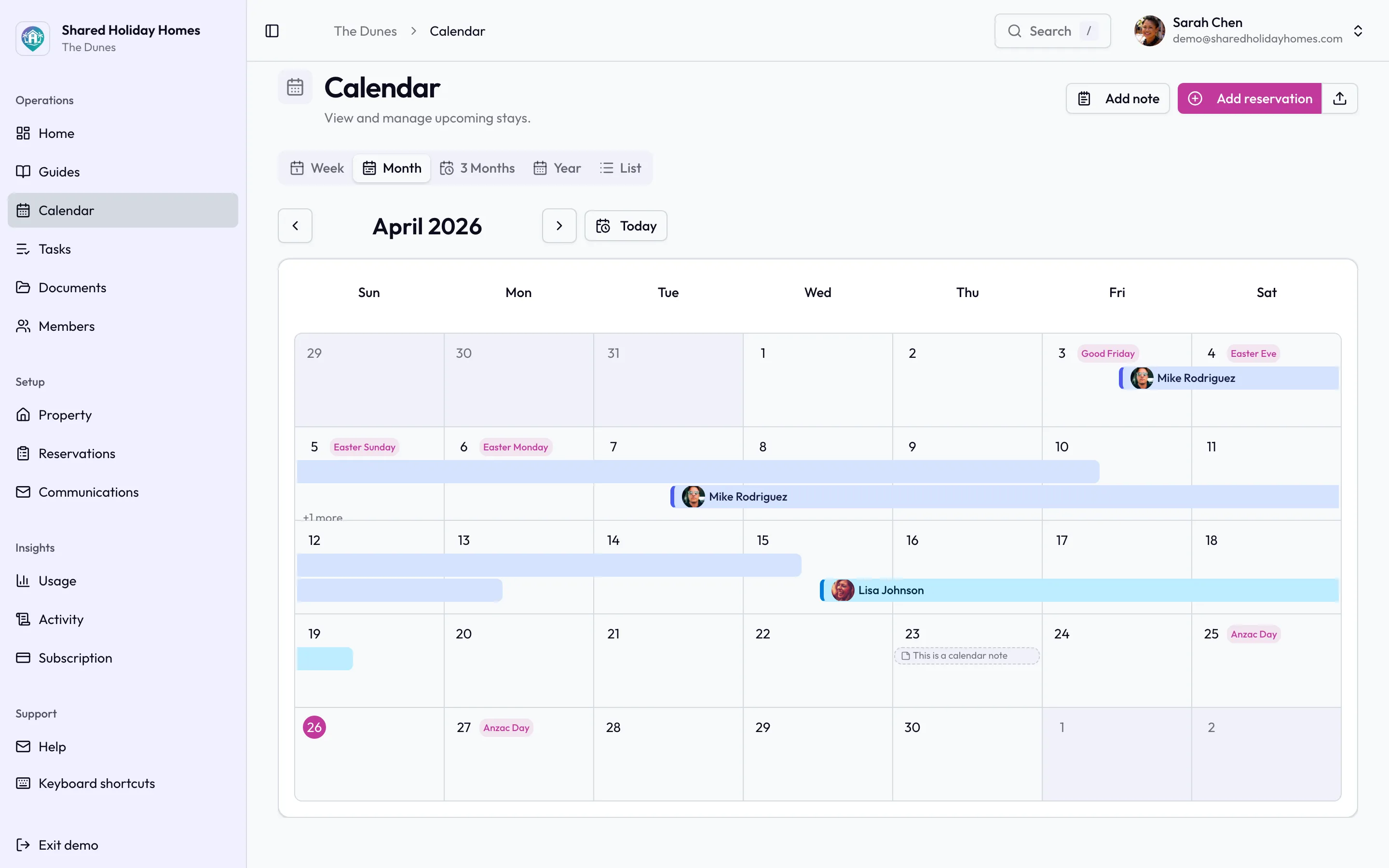
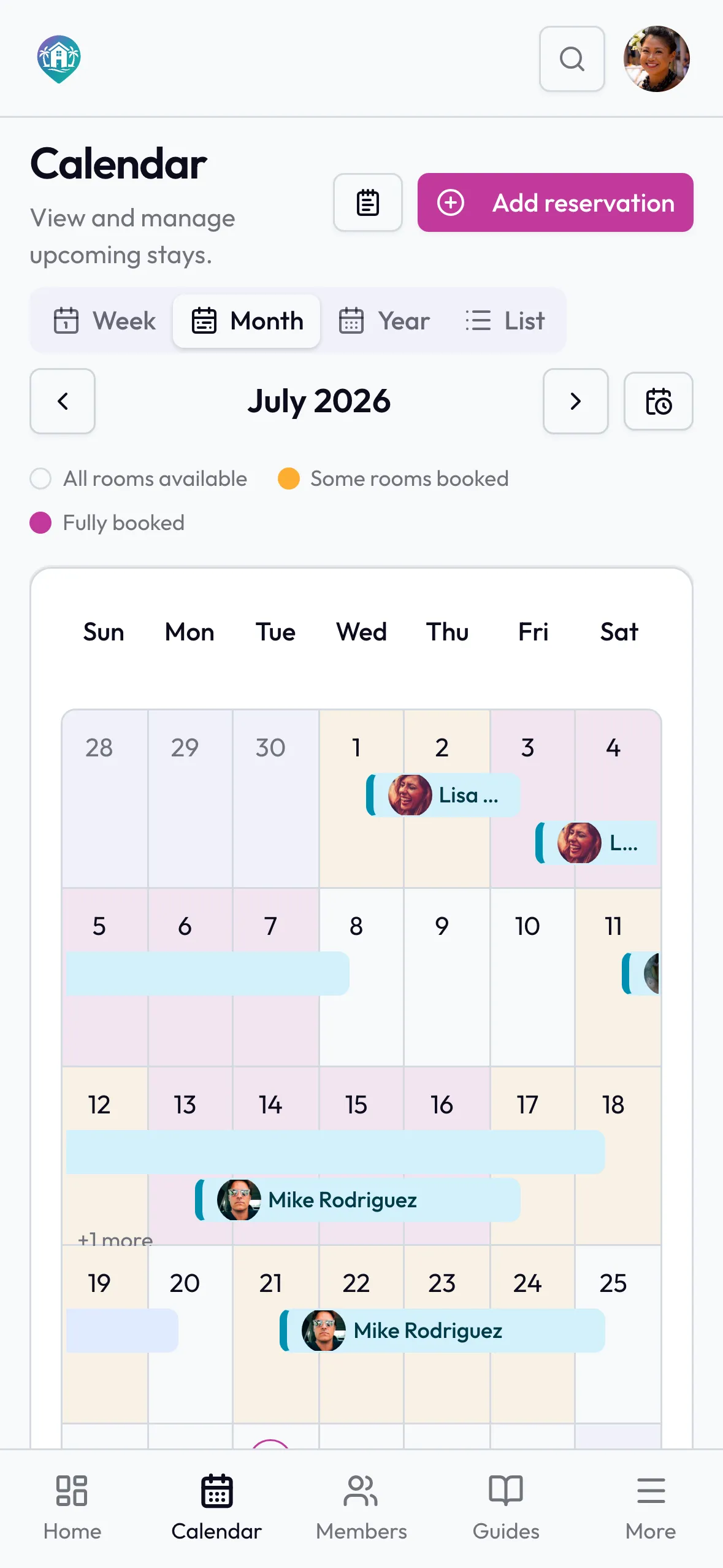
A co-ownership calendar records stays the whole group can see, instead of a shared Google event anyone with edit access can overwrite.
Booking rules the calendar can keep
Minimum stays, booking windows, peak-season rotations, and approval for certain dates can sit with the bookings instead of living only in a PDF nobody reopens. Agree the policy once, then let the system remind people what you already decided.
Shared task list
Assign maintenance and jobs to named people with due dates. The gutter clean, gas check, and bathroom leak stop living only in group chat.
Document library
Insurance, contracts, manuals, and key property files get one permanent home, with control over who can see what.
House guides
Arrival instructions, house rules, appliance notes, and local tips stay available for family, friends, and guests without another round of “who has the WiFi?”
Free planning tools while you decide
Before you migrate, draft a rules pack, test a usage rotation, and work through a cost-split method for shared expenses. The calendar choice and the money method should not fight each other.
The Cost Question
Google Calendar is free. Shared Holiday Homes is a paid product with a free trial. The useful question is not “is free better?” It is “what is the admin and conflict cost of staying on a general calendar?”
Stay free when the group is small, calm, and mostly scheduling stays. Consider a purpose-built tool when one avoided peak-date dispute, one prevented double booking, or one season of clearer task ownership would outweigh the subscription for the households involved.
Check current plans on the site during signup. Do not choose software because a comparison table invents a neat monthly figure; choose it because your group’s operating needs have outgrown a shared calendar.
Switching from Google Calendar
If you decide to move:
- Write or refresh the booking policy first, including peak dates, cancellations, guests, and maintenance blocks.
- Create the property in Shared Holiday Homes and invite the co-owners.
- Enter upcoming confirmed stays so nothing falls through the gap.
- Move the documents and house notes people actually ask for.
- Retire the old Google Calendar as the booking source of truth once everyone is using the new one. Keeping both live creates double updates and new conflicts.
You can still use Google Calendar personally for school terms or travel around the house stays. Retire it as the shared booking system, not as every calendar in everyone’s life.
FAQ
Is Google Calendar good enough for a shared vacation home?
Yes, for many small, high-trust groups with light admin. It becomes a weak fit when peak dates cause tension, more than a few households book, or tasks and documents need the same home as the calendar.
Can we keep Google Calendar and add spreadsheets for the rest?
You can. Many groups do. The risk is fragmentation: bookings in one place, fairness in another, jobs in chat, and documents in Drive. That stack works until one person stops updating their piece.
Do we need software before we write booking rules?
No. Write the rules first. Software helps enforce and share them; it cannot invent a fair policy for you. Start with the booking rules checklist and seasonal scheduling methods.
Does Shared Holiday Homes replace expense tracking?
Use a clear cost-split method for money decisions, whether that lives in a spreadsheet or a calculator. Shared Holiday Homes concentrates on calendar, rules, tasks, documents, and house guides. Pair it with a documented expense-split process so finance does not drift back into chat.
Keep the admin lighter
Use Google Calendar while it still matches the size and trust of your group. Move when the calendar is only recording stays and the real work — fairness, jobs, documents, and house knowledge — is happening everywhere else.
Start a free trial and see whether one shared place for bookings, rules, tasks, and house information removes the admin load your group has outgrown.


