

Shared Holiday Home Document Register Template
A shared holiday home document register is a searchable index of the group's important files. It records what each document is for, which copy is current, where the approved file lives, who can access it, who maintains it, and what date or event should trigger a review.
The register is not another folder and it does not replace the documents themselves. Use it to connect a clear reference to an insurance policy, operating rule, manual, invoice, professional report, guest guide, or other controlled file without copying sensitive contents into messages and spreadsheets.
When several recurring property services need an account-level index, use the service account register template to connect each provider and property to its controlled statement, authorised route, review trigger, finance record, and exceptions without copying credentials or full payment details.
For one lost or disputed provider login, use the account access recovery handover checklist to reference required evidence, provider acknowledgements and post-recovery updates without copying passwords, codes or identity documents into the register.
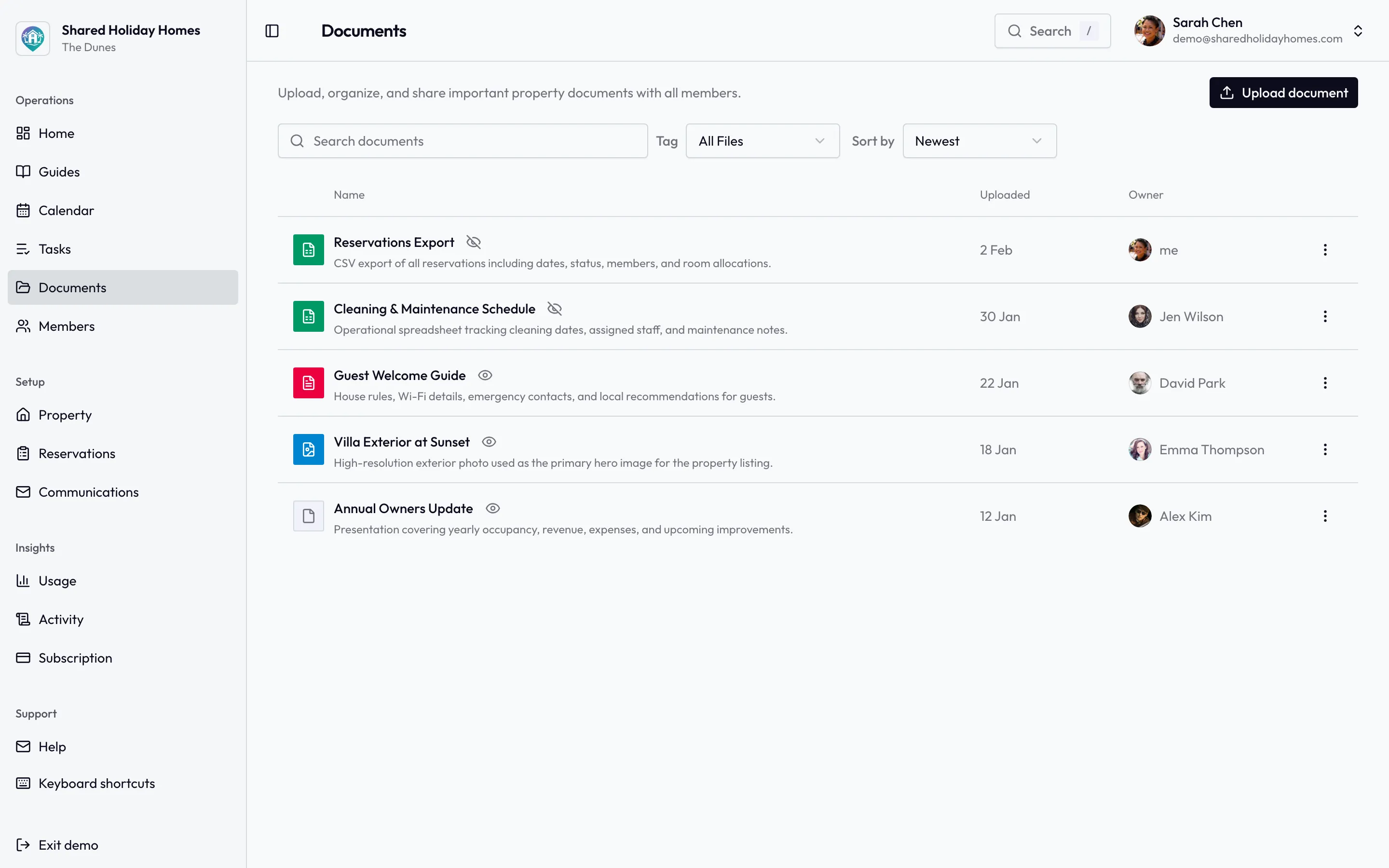
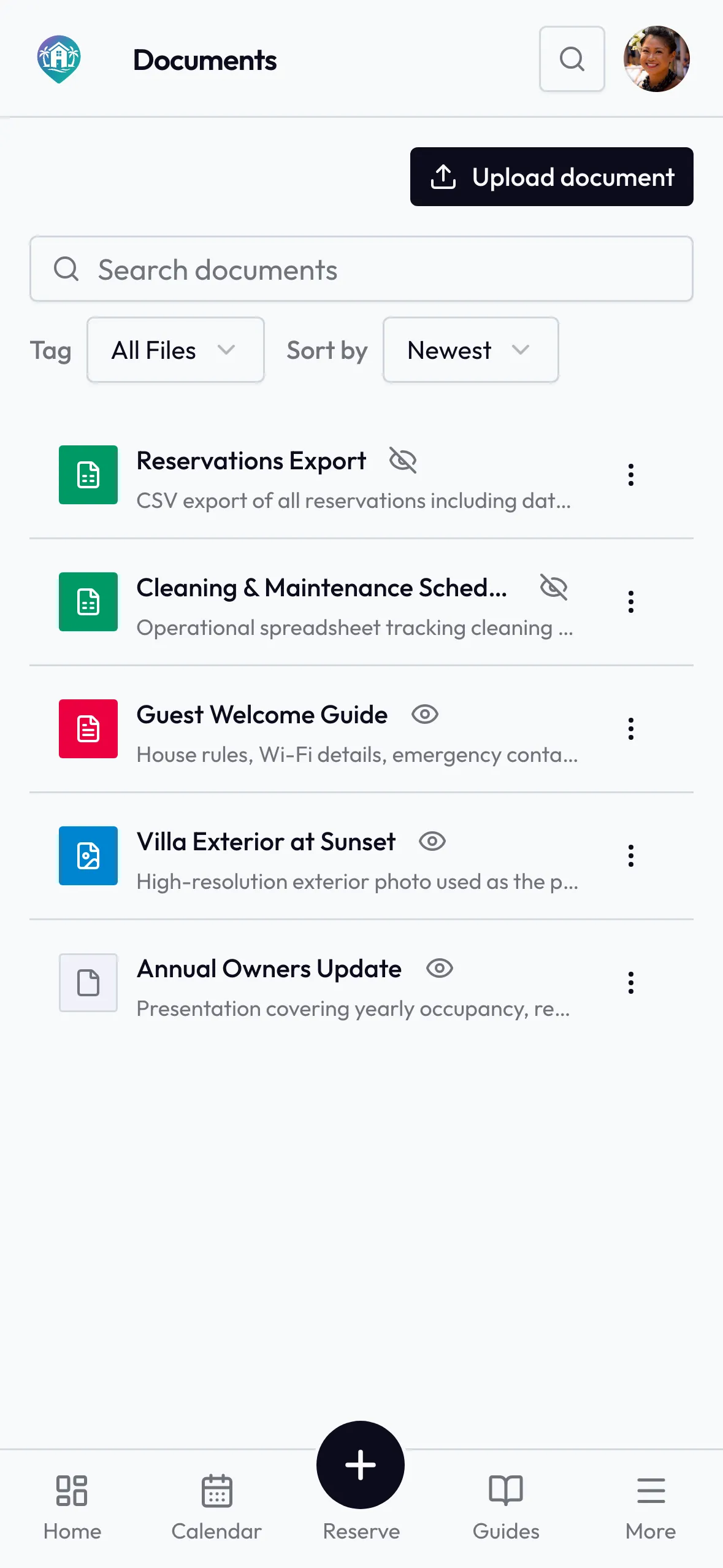
The register points to the current file. The files themselves still need one shared home the group can actually find.
Copy This Document Register Template
Create one row for each document set the group needs to find or review. A set can contain a current file and its superseded history, but only one version should be labelled as the approved current copy.
| Field | What to record | Fictional example |
|---|---|---|
| Register ID | A stable reference that is never reassigned | INS-001 |
| Category and title | A predictable category plus the document's exact name | Insurance — current property policy schedule |
| Purpose and scope | Why the group keeps it and which property, period, system, or decision it covers | Policy schedule for the lake house; 1 September 2026 to 31 August 2027 |
| Authoritative source | The person or organisation that issued, approved, or supplied the file | Insurer portal; downloaded by authorised policy contact |
| Current location | A controlled folder, document-system link, or exact physical location—not a password | House documents / Insurance / INS-001 / Current |
| Version and status | The file's own version or issue date plus a controlled register status | Issued 22 August 2026 — current |
| Effective and end dates | When the file begins to apply and any stated expiry, renewal, or replacement date | Effective 1 September 2026; ends 31 August 2027 |
| Access class | Who needs the file and which sharing route is permitted | Owner administrators; share externally only through the policy contact |
| Record owner and backup | Who checks the entry and who covers an absence | Jordan; backup: Casey |
| Review trigger | A date and any event that requires a source check | 1 July 2027; also after insurer, ownership, use, or material property changes |
| Previous copy | The superseded file reference and its controlled archive location | INS-001 / 2025–26 — superseded 1 September 2026 |
| Retention source | The insurer, adviser, authority, contract, or group rule used for keep-and-dispose decisions | Confirm with insurer and the group's qualified local adviser |
Do not use blank cells to hide uncertainty. Write “source not confirmed,” “review assigned,” or “not applicable” and give the gap an owner and due date. The register should expose missing control, not make an incomplete record look finished.
Keep the Register, Files, Decisions, and Tasks Separate
Four records often become tangled in one shared drive. Give each a distinct job:
- Document register: tells authorised people what a file is, which copy is current, where it is held, and when it needs attention.
- Controlled document: contains the actual policy, agreement, manual, invoice, report, rule, or guide.
- Decision log: records what the group approved, the valid approval route, effective date, and replacement history.
- Task list: shows who must obtain, review, renew, correct, or distribute something and by when.
For example, “renewal quote received” is a task update. The chosen insurance arrangement may require a decision record. The issued policy is the controlled document. The register points to the approved policy, names its owner, and carries its expiry and review trigger.
Use the shared holiday home decision log template for final operating choices and the roles and responsibilities chart for recurring accountability. A link between records is useful; duplicate copies that drift apart are not.
Choose Categories That Match How the Home Operates
Start with a small category set that your group can apply consistently. The exact documents vary by property, ownership structure, jurisdiction, use, and professional requirements.
Ownership and governing records
This area may point authorised readers to title, trust, entity, co-ownership, lending, succession, or other governing records that actually exist for the group. Do not use an informal register label to interpret or amend them.
Record the document's exact title, issuer or adviser, controlled location, current date or version, intended readers, and review source. When rights, ownership, trustees, borrowing, or governing documents change, assign a qualified review rather than guessing what else must be updated. If a current owner asks to leave, the vacation home co-owner exit plan shows how to assemble a dated fact pack and keep this register as the durable index.
Insurance, safety, and official records
Index the current files the group relies on, such as a policy schedule, insurer correspondence, inspection or service report, emergency plan, permit, certificate, or authority notice. The register should identify the source and current period without claiming that possession proves coverage, compliance, condition, or safety.
Keep specialist findings in the professional's document. A short register summary can help people select the right file, but it must not turn an observation into a diagnosis or remove conditions and limitations from their context.
Maintenance, systems, and supplier records
Useful references can include equipment manuals, warranties, service reports, maintenance plans, approved supplier details, quotes, invoices, and completion records. Use the vacation home maintenance log for the observation-to-completion history; use the register to locate the durable files supporting that history.
For one appliance, equipment item or installed product, use the shared holiday home warranty register template to connect the controlled receipt and written warranty to observed identifiers, a source date, review trigger and claim handoff. This document register still owns file location, version, access and review control.
The free maintenance schedule generator can help the group list recurring work. Treat its output as a planning draft, then check manuals, qualified advice, local conditions, and the actual property before approving dates or instructions.
Costs, tax, and payment evidence
Index approved budgets, statements, invoices, tax records, contribution rules, and adviser outputs only for people who need them. The register does not need bank details, card data, full account numbers, identity copies, or a duplicate ledger.
Where a file supports an expense, connect its stable reference to the expense record. Where retention, reporting, or disclosure matters, record the authoritative source for the rule rather than inventing a universal period.
House rules, bookings, and guest information
Keep owner governance separate from information intended for members or guests. The holiday home guest welcome book may contain approved arrival, appliance, local, emergency, and departure information. It should not expose owner financial records, private agreements, identity documents, alarm codes, or unrelated supplier data.
Use the free house rules generator to prepare a discussion draft. After the group approves a rule through its valid process, store the approved document, add its version and effective date to the register, and mark the replaced copy as superseded.
Use Statuses That Make the Current Copy Obvious
File names such as final, final-new, and really-final do not show authority or timing. Use a small controlled status set and keep its meaning beside the register.
Current
The approved copy in effect for the stated scope. There should normally be one current version for that exact document set. If two documents both apply to different periods, properties, or purposes, make those scopes explicit.
Draft
A working copy that has not completed the required approval or issue process. Drafts should not sit in the current location or be distributed as instructions. Name the draft owner and the next approval or evidence step.
Under review
The current file still exists, but a stated event has raised a question about accuracy, scope, or continued use. Record what remains safe to rely on, if anything, and who is obtaining the authoritative answer. Do not quietly relabel a serious uncertainty as current.
Superseded
A later approved or issued copy replaced this one. Preserve the old reference when the group's applicable retention source requires it or when it supports a past decision, expense, claim, or service history. Point forward to the current register ID.
Expired
The document passed its stated end date and no current replacement has been confirmed. “Expired” is a warning, not an instruction to delete. Assign the renewal, replacement, professional check, or safe disposal decision.
Assign Access by Need, Not Convenience
A document register is useful only if it helps the right people find the right file without broadening access unnecessarily. Define access classes in plain language. A small group might use:
- Member: ordinary operating information that every approved member needs.
- Owner or administrator: governance, financial, supplier, insurance, or other owner-level material.
- Restricted: sensitive material limited to named roles or a controlled external system.
- External share by approved route: a file that may go to a guest, contractor, insurer, adviser, or authority only for a stated purpose.
The label is not security by itself. Apply the corresponding permissions in the actual file location, remove access when roles change, and test important links through an authorised view where practical. Use the document access review checklist to compare intended audiences with actual accounts, groups, links, integrations, and physical copies without copying secrets into the review. When an approved participant joins after the formal ownership or authority work is complete, use the new holiday home co-owner onboarding checklist to stage document access alongside rules, bookings, costs, tasks, property information, and a review date. Do not paste passwords, access codes, alarm instructions, bank details, identity documents, medical information, or private disputes into the register.
Use the separate shared holiday home key and access register template for the live physical and digital access lifecycle: authorised audience, holder or administrator, controlled-detail location, issue and return states, last test, revocation, replacement, and backup. The document register can locate a lock manual or approved access policy, but neither register should reproduce a credential or spare-key location.
Shared Holiday Homes supports house-document uploads that can be visible to members or limited to administrators. Use that control for the approved file, then use an assigned task when someone must review or replace it. The broader register fields can live in the group's chosen controlled index; do not claim that software metadata replaces formal document control.
Build the First Register in 45 Minutes
Do not begin by moving every old attachment. First establish what the group needs and where the current source is.
1. Agree the boundary
Write one sentence: “This register indexes approved files needed to own, operate, maintain, and use this holiday home.” List what stays outside it, such as personal estate files, private medical information, unrelated investments, and duplicate chat attachments.
2. Create the category and status lists
Keep both lists short. Write their definitions above the register so two co-owners classify the same file in the same way.
3. Add the next 90 days first
Start with documents that expire, renew, guide a current task, support a planned stay, or affect an open decision within 90 days. Add stable governing and insurance sources next. This produces a useful register before the archive is complete.
4. Verify from the issuer or approved source
Open the actual file or authoritative portal. Confirm its exact title, issue or version date, scope, status, and controlled location. Do not mark a copy current because it is the newest email attachment someone can find.
5. Assign one owner and a backup
The owner checks the register entry and initiates review; the backup covers an absence. Neither role grants new authority to approve the document or interpret professional advice. Use the group's existing decision and authority rules.
6. Turn each gap into a task
“Policy not found,” “manual version unclear,” and “guest guide access untested” are actionable gaps. Give each one an owner, due date, and safe interim instruction. Keep task progress out of the register unless it changes the document's status.
7. Circulate a read-only first version
Ask each authorised reader to find three named documents without help. Correct broken locations, ambiguous titles, and inappropriate access. Then freeze the first approved register version and record how later changes will be made.
The complete co-owned vacation home management guide can help identify operating areas, while the annual review meeting agenda provides a bounded time to review missing, superseded, or expiring documents.
Worked Example for a Four-Household Group
The following entries are fictional. They demonstrate document control, not legal, insurance, tax, safety, or financial requirements.
| ID and document | Scope and location | Status and access | Owner and review |
|---|---|---|---|
| GOV-003 — booking policy | All owner households; House documents / Rules / GOV-003 | Current v4; member access | Morgan, backup Riley; review after peak season or a recorded exception |
| MAINT-014 — heat-pump manual | Installed unit in main house; House documents / Systems / MAINT-014 | Under review; owner administrators | Casey, backup Alex; verify model with installer before next planned service |
| GUEST-002 — welcome book | Approved arrival and house information; member guide | Current, issued 2 August; member access | Taylor, backup Morgan; review after provider, access, or emergency-detail changes |
| INS-001 — previous policy | Period ended 31 August 2026; controlled archive | Superseded by INS-001 issued 22 August 2026; restricted | Jordan, backup Casey; retention decision follows confirmed insurer and adviser source |
The group can now find the current rule and guest guide, see that the manual needs verification, and follow the old policy forward to its replacement. The register does not reproduce the documents or decide who had authority to approve them.
Review the Register Without Creating Timestamp Work
Give each entry a calendar date, an event trigger, or both. Use the shared holiday home admin calendar template when the group needs to turn a source date into preparation reminders, an owner, a backup, and verified close-out without copying the file into the calendar. Useful triggers include a new document issue, stated expiry, ownership or trustee change, insurer or lender change, completed major work, replaced equipment, supplier change, revised house rule, access-role change, or a professional instruction.
Review what changed. Do not reopen stable files every month merely to change a “checked” date. A practical review should answer:
- Can the intended reader open the approved current copy?
- Does the title, scope, issue date, and status match the source?
- Has a trigger occurred since the last substantive review?
- Is access still appropriate for current roles?
- Does a superseded file point to its replacement?
- Is any missing evidence assigned as a task?
Record a new last reviewed value only after an actual check. If nothing changed, leave the document itself untouched and record the completed review through the group's normal task or audit trail.
If a controlled emergency or guest document changes because a listed contact was replaced, use the emergency contact change handover to connect the new file version to the owner directory, audience copies, provider acknowledgements and unresolved exceptions.
Protect Formal Authority and Sensitive Information
An operational register cannot prove ownership, coverage, compliance, professional competence, document validity, or legal effect. It does not amend a deed, trust, contract, loan, policy, permit, court order, tax record, employment arrangement, or local accommodation rule.
Retention, disclosure, execution, privacy, tax, employment, insurance, safety, title, and trust requirements vary. Use the issuer, relevant authority, insurer, valid governing document, and appropriately qualified local adviser when those requirements matter. Record that source in the register so a future co-owner does not turn an informal habit into a universal rule.
FAQ
What should a shared holiday home document register include?
Include a stable ID, category and exact title, purpose and scope, authoritative source, current location, version and status, effective or end date, access class, record owner and backup, review trigger, previous-copy reference, and retention source. Add only fields the group will actually maintain.
Is a document register the same as a shared folder?
No. A folder stores files. The register explains which file is approved, what it covers, who may access it, and what should trigger review. A shared folder without this metadata can still contain duplicate, outdated, or ambiguous copies.
Which document version is current?
Confirm it from the issuer, approved decision, or other authoritative source for that document. Match the exact title, version or issue date, scope, effective period, and location. Do not assume the newest download or latest edited file is approved.
Should old documents be deleted?
Not automatically. Mark a replaced copy superseded, point it to the current version, and use the applicable insurer, authority, contract, professional, or group-governance source to decide retention and disposal. Different records can have different requirements.
Who should maintain the register?
Assign one record owner and a backup for each category or document set. They maintain metadata and initiate review; they do not gain extra voting power, legal authority, or permission to interpret specialist material.
Should guests see the document register?
Usually they need a deliberately prepared guide, not an owner register. Share only the approved information required for their stay through the intended guest route. Keep owner governance, finance, identity, security, and unrelated professional files restricted.
Is this for commercial fractional ownership or timeshares?
No. This template is for families, friends, siblings, trustees, and small groups already sharing or jointly owning a private holiday home. A commercial fractional provider or timeshare may have its own mandatory portal, contract, management authority, and record system.
Make the Current Copy Easy to Trust
Build the register before reorganising the archive. Add the next 90 days of important files, verify each current copy at its source, assign a record owner and backup, and turn every gap into a visible task.
Shared Holiday Homes is coordination software for private groups already sharing a home; it does not sell property shares, validate documents, or manage the property for you. It can keep house documents, assigned tasks, and shared property information close to the booking calendar. When your group is ready to bring the approved operating set together, start a free trial.


