

The Vacation Calendar Alternatives for Shared Family Vacation Homes
The Vacation Calendar is a long-running option for families who share a vacation home and want more than a blank shared calendar: a shared online schedule plus a private website with house content. For many groups it has been “good enough” for years.
People usually start searching for The Vacation Calendar alternatives when the group’s needs shift — more households, tighter peak-date rules, maintenance that keeps falling through chat, documents nobody can find, or a wish for a different price and feature mix. That search does not mean The Vacation Calendar failed. It means you should check whether another tool fits how your family actually runs the house now.
Disclosure: Shared Holiday Homes is our product. Details about The Vacation Calendar and other tools below come from their public websites and pricing pages as of 2026-08-06 (including thevacationcalendar.com). Features and prices change; confirm on each site before you decide.
Is There a Free Vacation Home Calendar?
Yes. Most families start with a shared Google Calendar: it is free, everyone already has it, and it shows who is staying. What it does not do is apply booking rules, track maintenance, or hold house information, so groups usually outgrow it when peak weeks start colliding or the same questions keep coming up in chat.
Purpose-built vacation home calendars add that structure for a modest annual fee. Public prices as of 2026-08-06:
- Free: Google Calendar. Works while the group is small and trust is high.
- Light and low-cost: Family Vacation Home (about $24.99–$49.99 a year), SharedKey (about $49 a year), and The Vacation Calendar ($40–$80 a year on annual plans).
- Fuller co-ownership tools: Our Shared Place ($99 per property a year, with rental sync) and Shared Holiday Homes (priced by number of rooms, 7-day trial with a card required at signup, plus free planning tools such as the usage rotation planner).
If a free calendar still works for your group, keep it. The rest of this page is for groups deciding whether The Vacation Calendar or one of its alternatives is worth paying for.
This guide is an alternatives page, not a takedown. We cover who The Vacation Calendar still fits, a fair comparison table, and brief notes on Shared Holiday Homes, Our Shared Place, SharedKey, CabinPals, Family Vacation Home, and (optionally) Google Calendar. For a wider survey, see shared holiday home calendar solutions. For a ranked 2026 landscape, see best shared vacation home calendar software 2026.
Why People Look for Alternatives
Most groups do not leave a working system for sport. They look when friction shows up in the same places:
Peak dates feel like a race
A shared calendar and house site help everyone see what is booked. They do not always stop Christmas week or summer from becoming a first-click contest. When fairness needs booking windows, rotations, or approvals, people shop for tools that can keep those rules closer to the calendar.
Admin is bigger than “who is there when”
Stays are only one job. Gutters, insurance PDFs, WiFi notes, vendor numbers, and “who cleans after” still live in email and group chat. Groups that want tasks, documents, and guides next to bookings start comparing purpose-built co-ownership tools.
Pricing and tier limits matter again
The Vacation Calendar’s public plans (as of 2026-08-06) run roughly $5–$9 per month or $40–$80 per year, with feature differences across Basic, Standard, and Premium — including rooms and multi-property on higher tiers. That can be excellent value. Other products publish flat annual fees, different trial lengths, or a different finance / rental / ops bundle. Budget conversations reopen the comparison.
The private website is nice — but not everyone’s centre of gravity
Photo albums, house blogs, bulletin boards, local guides, and guest books are a real strength of The Vacation Calendar’s model. Some families love that hub. Others want a lighter ops stack: calendar rules, named jobs, documents, and arrival guides — without another content surface to maintain.
Technology expectations have moved
Mobile apps, rental calendar sync, or expense modules are now common shopping criteria. Whether The Vacation Calendar’s advertised mobile app and feature matrix still match your list is a fair reason to re-evaluate — not a reason to assume it is obsolete.
Who The Vacation Calendar Still Fits
Keep (or stay with) The Vacation Calendar if most of these are true:
You want a shared calendar and a private family website in one product
If the photo album, house blog, bulletin board, local guide, guest book, and food items are part of how the family stays connected — not optional extras — The Vacation Calendar’s model is still a natural fit. Many “alternatives” are thinner on the website / social-hub side and thicker on ops.
Scheduling rules are enough for your conflict level
Their advertised scheduling rules (who can book, how far ahead, overlap, approvals) cover a lot of groups. If your policy is already working inside that frame, switching tools for theory alone is rarely worth it.
The price band matches your budget conversation
Basic / Standard / Premium at roughly $5 / $7 / $9 per month (or $40 / $60 / $80 per year as of 2026-08-06) is easy to explain at the annual meeting. Confirm the current feature matrix on their pricing page — rooms and additional properties sit on higher tiers.
The home is mainly for family stays, not a rental machine
If you are not chasing Airbnb/VRBO sync or a public booking page, a family-focused calendar-plus-website product can be exactly the right shape.
If that describes your group, you may not need an alternative. Pay for software that matches the operating load you actually have.
Comparison Table: The Vacation Calendar and Alternatives
Figures and feature notes below are public claims as of 2026-08-06. They are not a substitute for each vendor’s live pricing page. Shared Holiday Homes prices by holiday-home size (rooms); we do not invent a monthly figure here — check the amount at signup.
| Need | The Vacation Calendar | Shared Holiday Homes | Our Shared Place | SharedKey | CabinPals | Family Vacation Home |
|---|---|---|---|---|---|---|
| Public pricing (as of 2026-08-06) | Basic $5/mo or $40/yr; Standard $7/mo or $60/yr; Premium $9/mo or $80/yr | Plans by rooms; unlimited members; live price at checkout; 7-day trial | $99 per property / year; 14-day trial claimed | $49/yr (public); simple organizer positioning | Cabin co-ownership focus; confirm live pricing on their site | About $24.99–$49.99/yr (public band); cheap hub |
| Core pitch | Shared online calendar + private website for families | Calendar, booking rules, tasks, docs, house guides for private co-owner groups | Co-ownership plus rental hosting angle (Airbnb/VRBO sync advertised) | Simple shared-home organizer | Cabin co-ownership: stays, chores, costs | Low-cost shared vacation home hub |
| Shared stay calendar | Yes, with advertised scheduling rules | Yes, with booking rules and double-booking protection | Yes, with approval rules / round-robin queue advertised | Yes (organizer-focused) | Yes (stays as part of co-ownership ops) | Yes (hub-focused) |
| House content / website-style hub | Strong: album, blog, bulletin board, local guide, guest book, food items | House guides + document library (not a full family website suite) | Contacts, checklists, photo gallery among advertised modules | Lighter organizer surface | Chores / costs oriented more than a content site | Lightweight shared hub |
| Tasks / maintenance | House workflows via site features; confirm task depth on their site | Named jobs with due dates | Checklists advertised | Simpler organizer scope | Chores called out for cabin groups | Basic hub; confirm depth |
| Finances / expenses | Not the main advertised wedge vs calendar + website | Pair with a documented expense process; free cost-split calculator | Finances advertised in-product | Not the main public wedge | Costs part of cabin co-ownership story | Confirm on their site |
| Rental calendar sync | Family / private use focus | Not advertised; not a product focus | Airbnb/VRBO sync advertised | Not the main public wedge | Co-ownership / cabin focus | Confirm on their site |
| Multi-property | Additional properties on Premium (per their pricing matrix) | Confirm current plan limits at signup | Per-property pricing model | Confirm on their site | Confirm on their site | Confirm on their site |
| Best when… | You want calendar + private family website content | You want calendar rules + tasks + docs + guides for private co-owners | You also need rental hosting tooling and in-app finances | You want a simple, low annual fee organizer | Cabin co-owners want stays, chores, and costs together | Budget is the main constraint and a light hub is enough |
Alternative Deep-Dives
Shared Holiday Homes (ours)
Shared Holiday Homes is built for private families, friends, and co-owners who need the operating layer around the calendar: one live booking calendar, booking rules the calendar can keep, a shared task list, a document library, and house guides.
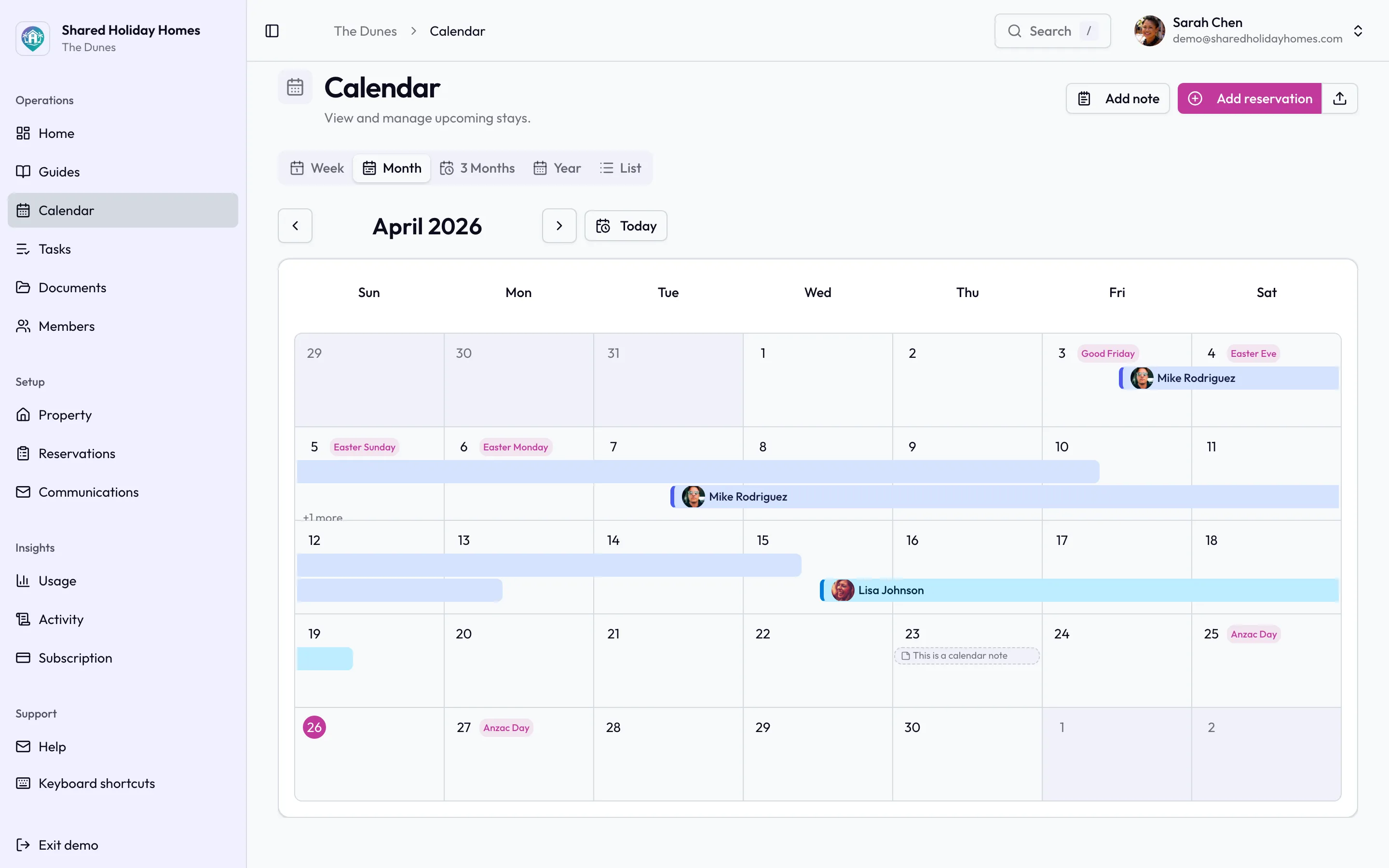
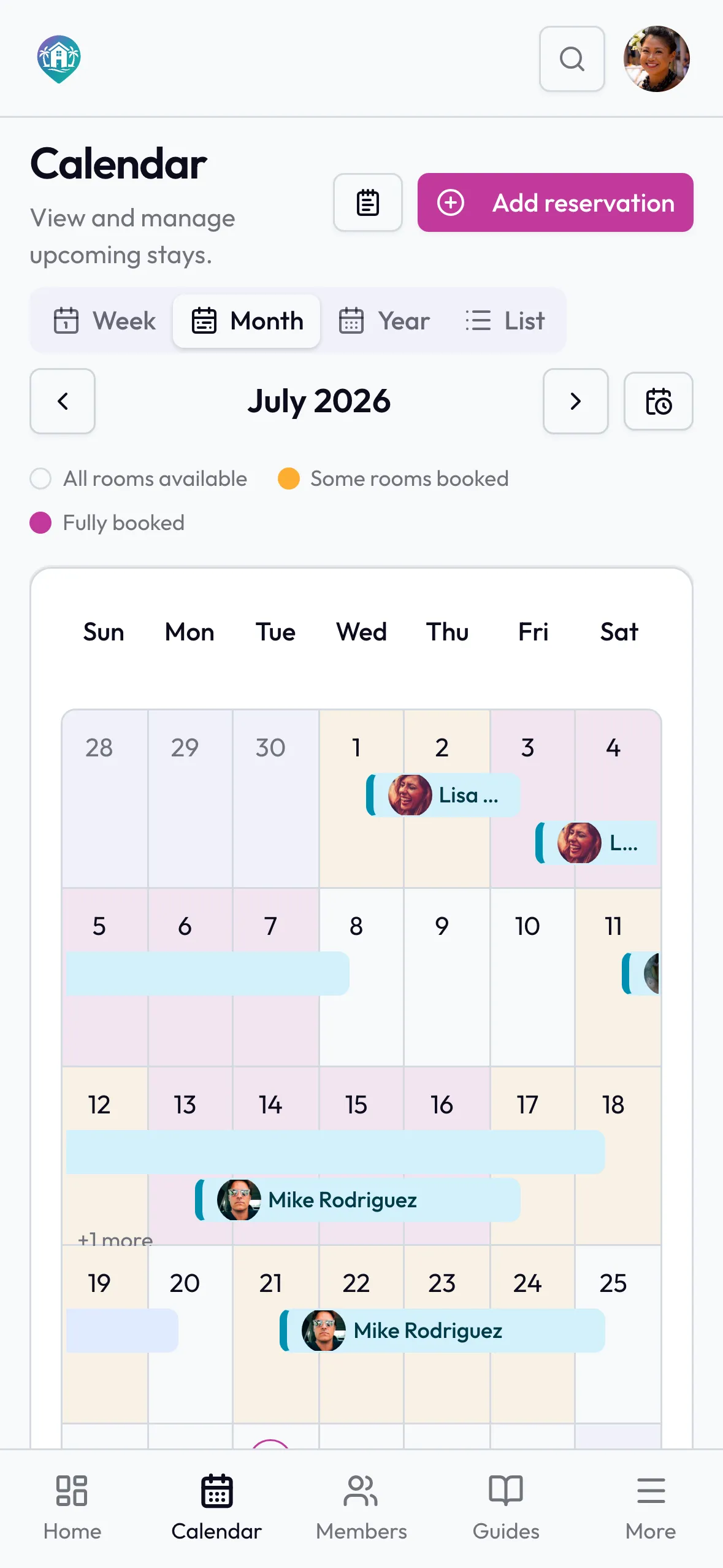
If you are replacing a family calendar, the next system still has to make stays obvious at a glance.
We do not invent a monthly price here. Plans are priced by holiday-home size (rooms), with unlimited members, and a 7-day free trial (a card is required at signup). Free tools such as the rules generator, usage rotation planner, and cost-split calculator help you write policy and money methods before you migrate.
Choose Shared Holiday Homes when peak fairness, named maintenance jobs, and a single home for documents and arrival notes matter more than a full private website suite or rental channel sync. Choose something else when you want The Vacation Calendar’s family website modules, Our Shared Place’s rental sync and finances, or the lowest annual hub fee.
Our Shared Place — $99/year, finances, rental sync
Our Shared Place markets co-ownership with a rental-hosting angle: advertised Airbnb/VRBO calendar sync, a public booking page story, and finances alongside the calendar. As of 2026-08-06 their public price is $99 per property per year, with a longer trial claimed on their site.
Strong when the home is family use plus short-term rental, or when the annual meeting wants a ledger next to bookings. Weaker if you want private co-owner ops without rental hosting. Full head-to-head: Shared Holiday Homes vs Our Shared Place.
SharedKey — $49/year simple organizer
SharedKey’s public positioning is a simpler shared-home organizer at roughly $49 per year. For groups that mainly need a light shared schedule and basic organization, that price and scope can be the honest fit. If your pain is peak-date policy, maintenance ownership, and document chaos, compare depth carefully during trial. Head-to-head: Shared Holiday Homes vs SharedKey.
CabinPals — cabin co-ownership (stays, chores, costs)
CabinPals aims at cabin-style co-ownership where stays, chores, and costs live together so the group text stops being the operating system. Confirm current pricing and modules on their site before you budget. If “chores + costs + stays” is the kitchen-table sentence, put CabinPals on the shortlist. Comparison: Shared Holiday Homes vs CabinPals.
Family Vacation Home — about $24.99–$49.99/year
Family Vacation Home competes as a cheap shared hub in a roughly $24.99–$49.99 per year public band (re-check their site; figures used for this 2026-08-06 roundup). Right when cost is the main constraint and expectations for rules, tasks, and documents are modest. A cheap tool nobody opens still loses to a free Google Calendar someone maintains. More: Shared Holiday Homes vs Family Vacation Home.
Optional: Google Calendar (free)
Google Calendar is still the default first system: free, familiar, and fast to share. It records events; it does not enforce booking policy, run maintenance, or store house knowledge. Stay on it while the group is small, high-trust, and light on admin. Direct comparison: Shared Holiday Homes vs Google Calendar.
How to Choose an Alternative
- Write the booking policy first. Peak dates, cancellations, guests, maintenance blocks, and swaps. Use the 12 booking decisions and seasonal scheduling guides if you need a starting pack.
- Name the primary job. Calendar + family website? Private co-owner ops (rules, tasks, docs, guides)? Rental sync + finances? Lowest annual fee? Pick one primary job.
- Price the whole year. Include trial length, multi-property needs, and whether money and rentals must live in the same app.
- Run two trials in the same week if you are torn — migrate one real month of stays plus the documents people actually ask for.
- Retire the old source of truth. Keeping two booking systems live creates double updates. Personal Google Calendars can stay; the shared booking system should have one winner.
Draft a usage rotation before peak season if fairness — not website features — is why you are shopping.
FAQ
Is The Vacation Calendar still a good choice in 2026?
Yes, for many families who want a shared calendar and a private website-style hub with albums, guides, and related house content, at a modest Basic–Premium price band. Look elsewhere when your primary needs are rental sync, deeper task/document ops, a different price model, or a simpler organizer.
What is the closest alternative to The Vacation Calendar?
There is no perfect clone. Shared Holiday Homes and Our Shared Place are the closest “fuller” purpose-built options with different emphases (private ops vs rental + finances). SharedKey and Family Vacation Home sit closer to lighter / cheaper organizers. CabinPals is strongest when cabin co-ownership chores and costs are central. Match the job, not the brand story.
Can we move from The Vacation Calendar without losing history?
Plan an overlap week. Export or screenshot upcoming stays, copy critical house notes and contacts, invite members to the new tool, enter confirmed bookings, then retire The Vacation Calendar as the booking source of truth. There is rarely a one-click migrate between competitors — treat the move like a small project, not a button.
Do we need to pay if Google Calendar is free?
Not always. Stay free while trust is high and admin is light. Consider a paid co-ownership tool when one avoided peak dispute, one prevented double booking, or one season of clearer task and document ownership would outweigh the subscription for the households involved.
Does Shared Holiday Homes replace The Vacation Calendar’s private website features?
Not as a like-for-like website suite. Shared Holiday Homes concentrates on calendar, booking rules, tasks, documents, and house guides. If photo albums, house blogs, and bulletin boards are non-negotiable, keep The Vacation Calendar or keep a separate place for that content.
Keep the admin lighter
Stay with The Vacation Calendar when the shared calendar plus private family website still matches how your group lives. Switch when the real work — fairness rules, jobs, documents, rentals, or cost — needs a different product shape.
If Shared Holiday Homes sounds like the fit — private co-owner bookings, rules, tasks, and house information in one place — start a free trial and test it against the alternative that was already on your shortlist.


